CCBrowser for Canton Network
Block explorers can be complex and difficult to understand. CCBrowser by Noves allows you to quickly read and analyze Canton transactions, with human-friendly descriptions. Available on all Canton explorers.
Step by Step Instructions
Step by Step Instructions
STEP 1 — Download the Extension
On Google Chrome, install the "CCBrowser by Noves" extension. Then, open any Canton block explorer (CC Explorer, CC View, etc.)
STEP 1 — Download the Extension
On Google Chrome, install the "CCBrowser by Noves" extension. Then, open any Canton block explorer (CC Explorer, CC View, etc.)
STEP 2 — Activate Your Account
Once you've installed the Chrome Extension on your desktop, open any Canton block explorer. When you are actively viewing a Canton explorer, the extension icon will appear in the bottom right corner. Then, sign up with your email and discount code (if you have one). Finish the payment flow via Stripe and check your email.
STEP 3 — Check Your Email
To complete the activation, confirm your email by clicking the magic link in your inbox (check your spam folder as well).
STEP 4 — Analyze Transactions
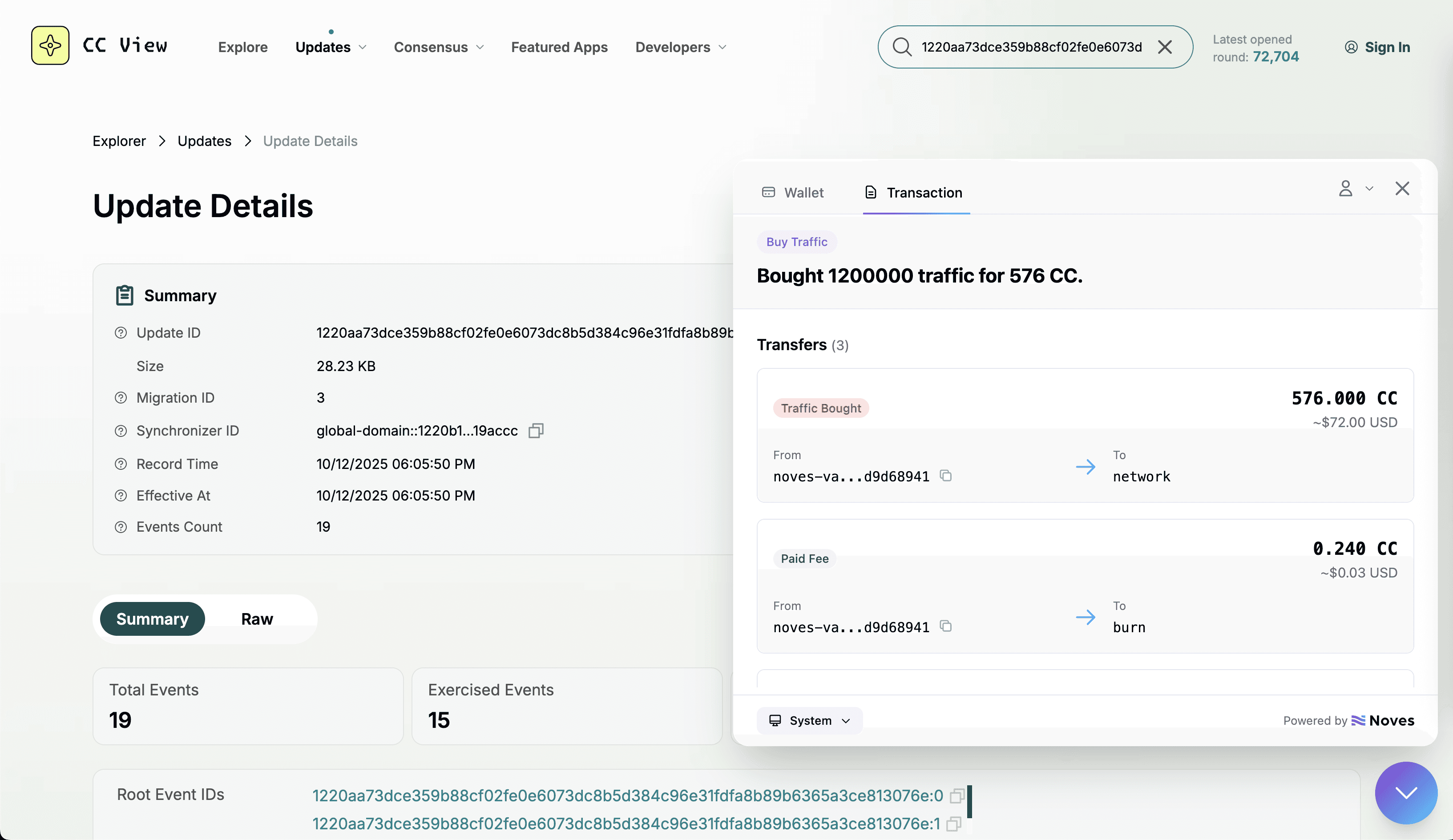
The Chrome extension activates ONLY when you are viewing a transaction on a Canton explorer. The transaction analysis displays a classified tx, assets flow, parties involved, and more.
STEP 5 — Rewards
Once you've passed the 20 CC threshold, click the "Withdraw" button and enter your payout address. Note: Rewards are from Canton Network. CCBrowser does NOT control rewards, if rewards are up or down, or even how long rewards will exist on Canton Network.
STEP 2 — Activate Your Account
Once you've installed the Chrome extension on your desktop, open any Canton block explorer. When you are viewing a Canton explorer, the extension icon will appear in the bottom right corner. Then, sign up with your email and discount code (if you have one). Finish the payment flow via Stripe and check your email.
STEP 2 — Activate Your Account
Once you've installed the Chrome Extension on your desktop, open any Canton block explorer. When you are viewing a Canton explorer, the extension icon will appear in the bottom right corner. Then, sign up with your email and discount code (if you have one). Finish the payment flow via Stripe and check your email.
STEP 3 — Check Your Email
To complete the activation, confirm your email by clicking the magic link in your inbox (check your spam folder as well).
STEP 3 — Check Your Email
To complete the activation, confirm your email by clicking the magic link in your inbox (check your spam folder as well).
STEP 4 — Analyze Transactions
The Chrome extension activates ONLY when you are viewing a transaction on a Canton explorer. The transaction analysis displays a classified tx, assets flow, parties involved, and more.
STEP 4 — Analyze Transactions
The Chrome extension activates ONLY when you are viewing a transaction on a Canton explorer. The transaction analysis displays a classified tx, assets flow, parties involved, and more.
STEP 5 — Rewards
Once you've passed the 20 CC threshold, click the "Withdraw" button and enter your payout address. Note: Rewards are from Canton Network. CCBrowser does NOT control rewards, if rewards go up or down, or how long rewards will exist on Canton Network.
STEP 5 — Rewards
Once you've passed the 20 CC threshold, click the "Withdraw" button and enter your payout address. Note: Rewards are from Canton Network. CCBrowser does NOT control rewards, if rewards go up or down, or even how long rewards will exist on Canton Network.
Frequently Asked Questions (FAQ)
Frequently Asked Questions (FAQ)
Everything you need to know about CCBrowser.
Everything you need to know about CCBrowser.
Everything you need to know about the Data App.
What is CCBrowser?
How much does CCBrowser cost?
Can I pay with CC (Canton Coin)?
How do I get started?
How do rewards work?
When can I withdraw my rewards?
I'm not happy with rewards. Can I get a refund?
The extension doesn't work on CCView, why?
How can I use CCBrowser as a tool?
How can I contact support?
The team is not responding. How can I get help?
What is Noves?